
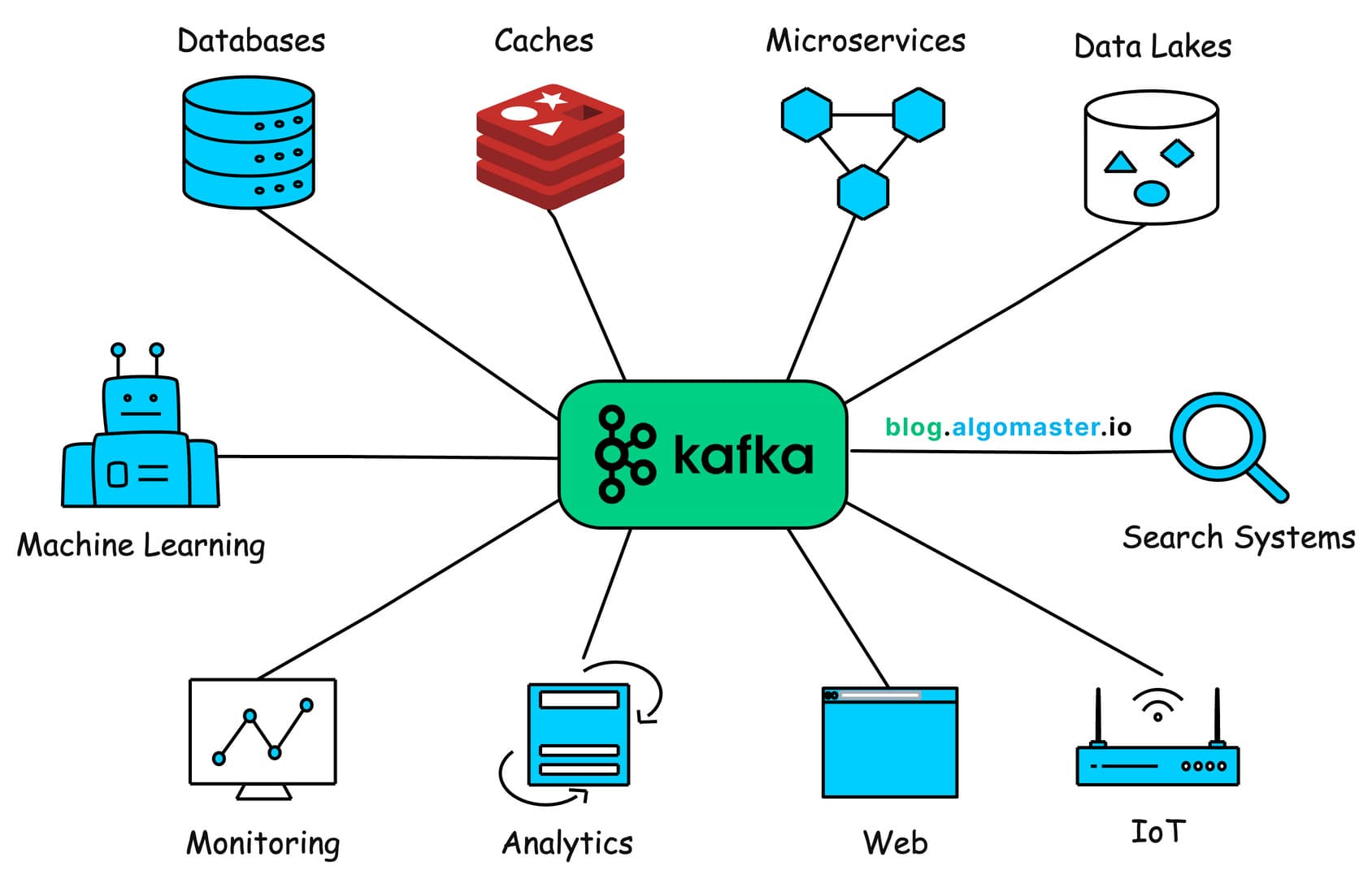
Understanding Apache Kafka Architecture.
A comprehensive guide to understanding Apache Kafka's architecture and internal workings. Learn about producers, consumers, topics, partitions, and how Kafka handles massive data streams in real-time.
Apache Kafka is a distributed event streaming platform that has become the backbone of modern data architectures. Originally developed at LinkedIn, it now powers thousands of companies including Uber, Netflix, Airbnb, and more. But what makes Kafka so special? Let's break it down in simple terms.
What is Kafka?
Think of Kafka as a super-powered, distributed message queue. Unlike traditional message brokers, Kafka is designed to handle massive amounts of data in real-time, making it perfect for:
- Real-time data pipelines
- Log aggregation
- Stream processing
- Event-driven architectures
- Microservices communication
Core Architecture Components
1. Producers
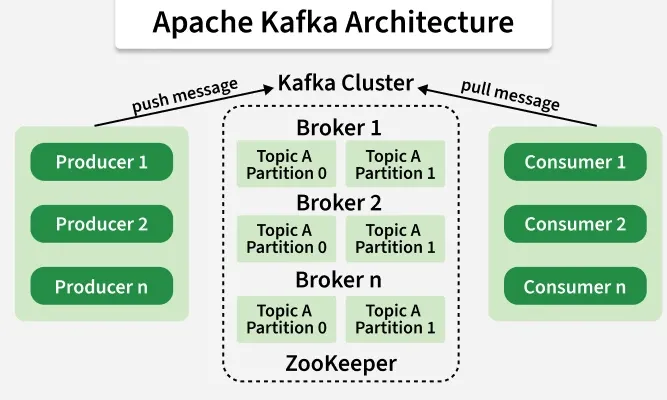
Producers are applications that send data to Kafka. They don't care who reads the data or when - they just publish messages to topics.
Producer → "Hey, here's some data!" → Kafka
2. Topics
A Topic is like a category or feed name to which records are published. Topics are multi-subscriber, meaning a topic can have zero, one, or many consumers that subscribe to the data written to it.
Example topics:
user-clicksorderssystem-logs
3. Partitions
Each topic is split into Partitions. Think of partitions as shards of a topic:
Topic: "orders"
├── Partition 0: Order 1, Order 4, Order 7
├── Partition 1: Order 2, Order 5, Order 8
└── Partition 2: Order 3, Order 6, Order 9
Why partitions?
- Parallelism: Multiple consumers can read from different partitions simultaneously
- Scalability: Distribute data across multiple servers
- Ordering: Messages within a partition are ordered, but not across partitions
4. Brokers
Kafka runs as a cluster of servers called Brokers. Each broker handles some partitions of topics. If you have 3 brokers and a topic with 3 partitions, each broker might handle one partition.
5. Consumers
Consumers read data from topics. They can be part of a Consumer Group - multiple consumers working together to process data from a topic.
Consumer Group A
├── Consumer 1 reads Partition 0
├── Consumer 2 reads Partition 1
└── Consumer 3 reads Partition 2
How Messages Flow
The Journey of a Message
-
Producer creates a message
Key: "user123", Value: {"action": "click", "page": "/home"} -
Kafka determines which partition
- If a key is provided, it hashes the key to pick a partition
- This ensures all messages with the same key go to the same partition (preserves order)
- If no key, round-robin distribution
-
Message written to the partition
- Appended to the commit log (disk)
- Gets an offset number: 0, 1, 2, 3, ...
-
Consumer reads the message
- Tracks which offsets it has read (commit offset)
- Can replay messages from any offset
Key Concepts Simplified
Commit Log
Kafka stores messages as a commit log on disk. This is simple but powerful:
- Append-only: New messages always go to the end
- Immutable: Existing messages never change
- Persistent: Data survives server restarts
- Fast: Sequential disk writes are very fast
Offsets
Each message in a partition gets a unique offset (like a line number in a file):
Partition 0:
Offset 0: {"user": "alice", "action": "login"}
Offset 1: {"user": "bob", "action": "view_page"}
Offset 2: {"user": "alice", "action": "click"}
Consumers track which offsets they've consumed, so they can:
- Resume where they left off after a crash
- Re-process old messages if needed
- Read from any point in time
Replication
For reliability, Kafka replicates partitions across multiple brokers:
Partition 0:
├── Broker 1: Leader (handles all reads/writes)
├── Broker 2: Follower (copies from leader)
└── Broker 3: Follower (copies from leader)
If the leader fails, a follower takes over automatically!
Retention
Kafka keeps messages for a configurable time or size:
- Time-based: Keep for 7 days (default)
- Size-based: Keep until 1 GB of data
- Compacted: Keep latest value per key
After retention, old messages are deleted (but you control this).
Producer Internals
Batching
Producers don't send messages one-by-one. They batch messages:
Producer collects messages:
[Message1, Message2, Message3, ... Message1000]
↓
Sends one batch to Kafka
This reduces network overhead and increases throughput.
Acknowledgment (acks)
Producers can control durability:
- acks=0: Fire and forget (fastest, least safe)
- acks=1: Wait for leader acknowledgment (balanced)
- acks=all: Wait for all replicas (safest, slower)
Consumer Internals
Pull vs Push
Kafka uses a pull model:
- Consumers ask Kafka for messages
- Not pushed from Kafka
- Gives consumers control over processing speed
Consumer Groups
Multiple consumers can form a group:
- Each partition is read by only ONE consumer in the group
- Add more consumers = more parallelism (up to number of partitions)
- Perfect for scaling out processing
Topic with 6 partitions:
Consumer Group (3 consumers)
├── Consumer A: Reads partitions 0, 1
├── Consumer B: Reads partitions 2, 3
└── Consumer C: Reads partitions 4, 5
Offset Storage
Modern Kafka consumers store offsets in a special Kafka topic (__consumer_offsets):
- Survives consumer restarts
- Enables rebalancing when consumers join/leave
- Prevents data loss or duplication
Performance Secrets
Why is Kafka so fast?
- Zero Copy: Data never copied between user and kernel space
- Sequential I/O: Only sequential disk writes (no random seeks)
- Page Cache: Heavily relies on OS page cache
- Batching: Everything is batched (reads, writes, network)
- No B-tree: Simple append-only logs, no complex indexes
Typical Performance Numbers
- Throughput: Millions of messages per second per cluster
- Latency: Single-digit milliseconds
- Scale: Petabytes of data storage
Common Use Cases
- Activity Tracking: Website clicks, user actions
- Log Aggregation: Centralizing logs from many services
- Stream Processing: Real-time analytics with KSQL or Flink
- Event Sourcing: Storing all changes to application state
- Commit Log: Database change data capture (CDC)
Summary
Kafka's power comes from its simplicity:
- Simple append-only logs
- Partitioning for parallelism
- Replication for reliability
- Pull-based consumption for control
This design makes Kafka:
- ✅ Fast (millions of messages/sec)
- ✅ Scalable (add more brokers/partitions)
- ✅ Reliable (replication and disk persistence)
- ✅ Flexible (any data format, any use case)
Getting Started
Want to try Kafka? Here's a quick start with Docker:
# Start Kafka with Docker Compose
docker-compose up -d

# Create a topic
kafka-topics.sh --create --topic my-first-topic \
  --bootstrap-server localhost:9092 \
  --partitions 3 --replication-factor 1

# Produce messages
kafka-console-producer.sh --topic my-first-topic \
  --bootstrap-server localhost:9092

# Consume messages
kafka-console-consumer.sh --topic my-first-topic \
  --bootstrap-server localhost:9092 --from-beginning
Happy streaming! 🚀